
# Werkbaum
**English** · [Deutsch](README.de.md)
**▶ Try it live: ** (latest deployed version)
A textual, Markdown-like notation for work breakdown structures with
and/or decomposition — plus a live editor that renders it as a diagram.
```
[~] Werkbaum (XL) https://wiki.example.de/relaunch
- [~] Document store
| [x] Text file with copy+paste in the frontend (S)
- [x] Parser
- [x] Text input field in the frontend
| [ ] Backend
- [~] Display/rendering (XL)
- [/] H (S) @anna
- [ ] CMS integration (M)
| [ ] WordPress
| [?] Headless CMS
```
`-` = mandatory sub-package (all of, side by side in the diagram) ·
`|` = alternative (any of, stacked) · `[…]` = status ·
`(M)` = T-shirt effort · `@name` = responsibility · `%%` = comment.
## Usage
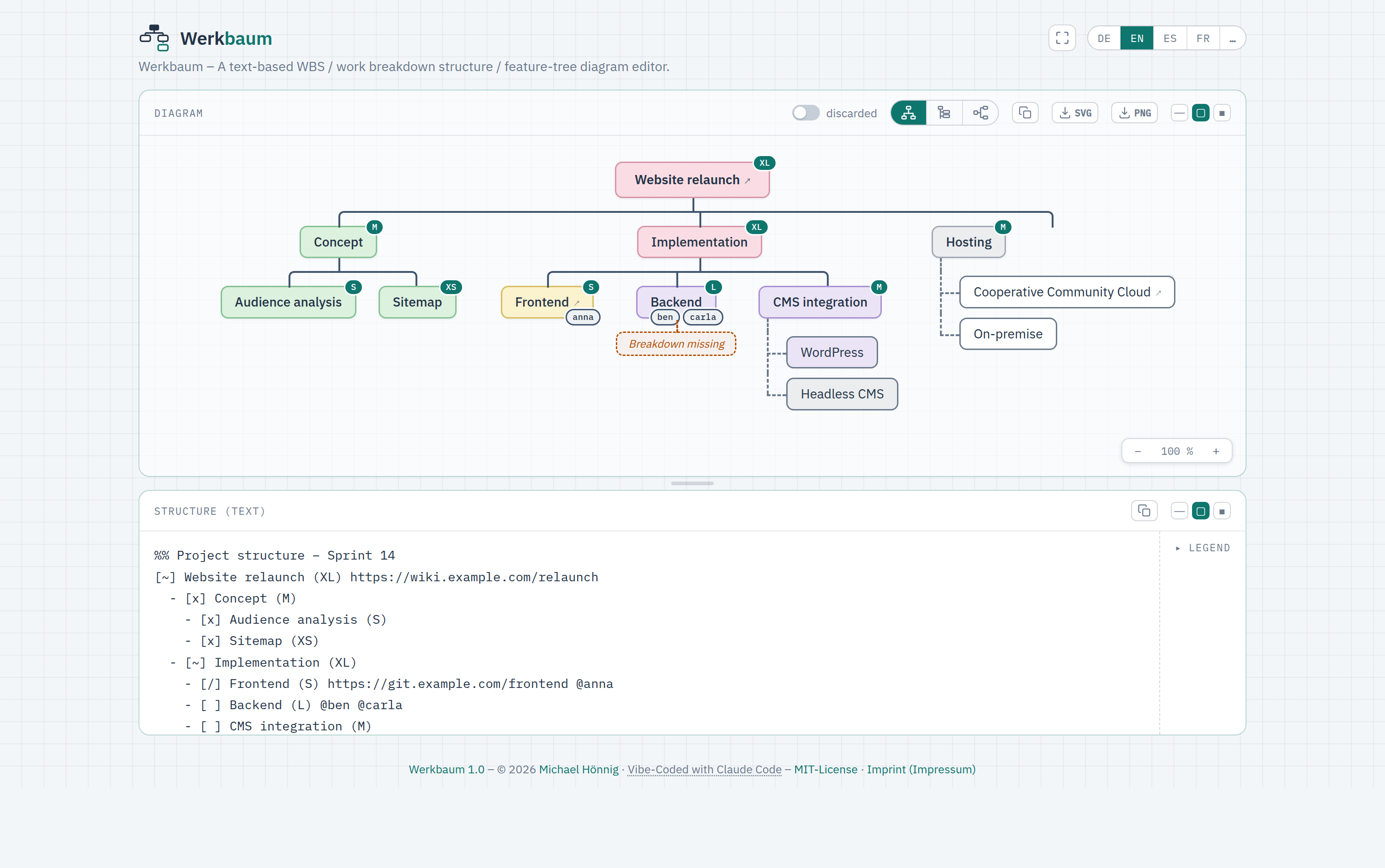
Open the [hosted editor](https://mhoennig.github.io/werkbaum/) — edit text on
the left, the diagram is built live on the right. Toggles: transposed (narrow)
layout, show discarded elements.
### Running it locally
The editor source now lives as ES modules under `frontend/src/`, bundled by
[Vite](https://vitejs.dev/) (see `docs/DECISIONS.md` D19). Because browsers block
ES-module imports over `file://`, opening `frontend/index.html` directly no
longer works — use one of:
```bash
cd frontend
npm install # once
npm run dev # dev server at http://localhost:8137
npm test # Vitest unit tests
npm run build # -> frontend/dist/index.html (single self-contained file)
```
The built `dist/index.html` inlines all JS, CSS and the favicon, so **that** file
does open standalone via `file://` and is what gets deployed.
### Build hint & your own production install
Non-production builds carry a small hint next to the title (symbol + tooltip) so
it's clear this is **not** the stable instance:
- **Dev server** (`npm run dev`) → 🔧 "Preview – local development build"
- **Default build** (`npm run build`, incl. the GitHub Pages deploy) → 🚧
"Latest build – may still be buggy"
For **your own production install** the hint is switched off:
```bash
cd frontend
npm ci # or: npm install
npm run build:prod # -> frontend/dist/index.html WITHOUT the hint
```
`build:prod` runs Vite in mode `prod`; `frontend/.env.prod` sets
`VITE_BUILD_BADGE=none`, so the badge code is tree-shaken away entirely (it isn't
even present in the output source). Drop the resulting `dist/index.html` onto your
web space/server (standalone, `file://`-capable). Details: `app.js`
(`mountBuildBadge`), `docs/DECISIONS.md` D16.
Two things otherwise handled only by the Pages workflow, to fix up yourself when
self-hosting: the footer **MIT-License** link is relative to `../LICENSE` (place
that file one level above `index.html`, or adjust the link), and the **version
number** stays the source placeholder `1.0` (the workflow otherwise replaces it
from `VERSION` + commit count).
## Project documents
- `frontend/` — editor · `backend/` — Kotlin/Spring (scaffold to follow, see backend/README.md)
- `docs/SPEC.md` — normative language definition
- `docs/DECISIONS.md` — design decisions with rationale
- `docs/ROADMAP.md` — Mermaid plugin, Taiga integration, Tenzu
- `docs/TASKS.md` — open tasks (checkboxes)
- `docs/brand/BRAND.md` — logo, wordmark, usage rules
- `docs/design/` — design derivation of the brand
- `CLAUDE.md` — project context for Claude Code
> **Note:** The detailed project documentation under `docs/` is maintained in
> German, the project's source language (see `CLAUDE.md`). This README is
> available in [English](README.md) and [German](README.de.md).
## Deployment
The editor is published as a static page on **GitHub Pages** via GitHub
Actions (workflow: `.github/workflows/pages.yml`). Triggered on every push to
`main` and manually (`workflow_dispatch`).
The workflow sets up Node, runs `npm ci`, `npm test` (Vitest) and `npm run build`
(Vite), then publishes the bundled `frontend/dist/index.html` as `index.html` at
the root URL, plus `LICENSE` for the MIT link in the footer. The favicon is
already inlined into the build, so nothing else needs copying; only the runtime
`../LICENSE` link is straightened on the copy. A failing test blocks the deploy.
`backend/` and the remaining `docs/` are not published.
While assembling the site, the workflow also stamps the version into the footer:
**major.minor** comes from the `VERSION` file (bumped by an explicit "bump
commit"), and the **micro** part is the number of commits since that last bump —
so it grows with every commit and resets to `0` right after a bump
(`Werkbaum 1.0.0`, `1.0.1`, … then bump `VERSION` to `1.1` → `1.1.0`). Nothing is
written back to the repo. In the footer the name **Werkbaum** links to the
repository, while the **version number** links to that exact commit
(`…/commit/`). Opened locally, the editor shows the source placeholder
(`Werkbaum 1.0`).
**One-time setup:** In the repo settings under **Pages**, select **Source** =
"GitHub Actions". The repo must be **public** for this (GitHub Pages via Actions
is only available for private repos on a paid plan).
## License
MIT — see [LICENSE](LICENSE). © 2026 Michael Hönnig.